
Adobe SDK
The JavaScript-based Adobe PDF Embed API allows us to embed PDF viewers, showing manipulated (encrypted/passworded and/or stamped) PDFs on our WordPress site using PDF Ink shortcodes. These embeds can be highly customized using filter hooks, becoming handsome and useful interfaces for your users.
You can set up an embed on any page or post you would like using the easy-to-generate PDF Ink shortcodes. This requires no more coding than using any other WordPress shortcode. If you wish to customize the embed further, that is possible using filter hooks.
Using a default PDF Ink embed shortcode with its defaults might be just fine for your purpose. But it isn’t too hard to customize using PHP. You and/or your developer will want to familiarize with use of the Adobe SDK API and the Adobe SDK PDF appearance/function control options in order to customize your embeds further.
SDK parameters are filtered by PDF Ink in the following call:
$parameters = apply_filters( 'pdfink_filter_adobe_sdk_parameters', [
				'embed_mode'                => 'FULL_WINDOW',
				'locale'                    => 'en-US',
				'report_suite_id'           => 'None',
				'measurement_id'            => 'None',
				'file_name'                 => $atts['file_name'],
				'send_auto_pdf_analytics'   => true,
				'show_download_pdf'         => true,
				'show_print_pdf'            => true,
				'show_annotation_tools'     => true,
				'show_zoom_control'         => true,
				'show_full_screen'          => true,
				'show_thumbnails'           => true,
				'show_bookmarks'            => true,
				'focus_on_rendering'        => true,
				'enable_form_filling'       => true,
			], $atts );
So, if we wanted to change the PDF embed file name and not show bookmarks or thumbnails or print option, we could add this code to our WP child theme functions.php file:
function filter_my_adobe_sdk_parameters( $parameters, $attributes )( {
    return [
        'embed_mode'                => 'FULL_WINDOW',
		'locale'                    => 'en-US',
		'report_suite_id'           => 'None',
		'measurement_id'            => 'None',
		'file_name'                 => 'My new file name', // changed from default
		'send_auto_pdf_analytics'   => true,
		'show_download_pdf'         => true,
		'show_print_pdf'            => false, // changed from default
		'show_annotation_tools'     => true,
		'show_zoom_control'         => true,
		'show_full_screen'          => true,
		'show_thumbnails'           => false, // changed from default
		'show_bookmarks'            => false, // changed from default
		'focus_on_rendering'        => true,
		'enable_form_filling'       => true,
    ];

}
add_filter( 'pdfink_filter_adobe_sdk_parameters', 'filter_my_adobe_sdk_parameters', 10, 2 );
Another way of making the same change to SDK embed parameters using PHP looks like this:
function simpler_filtered_adobe_sdk_parameters( $parameters, $attributes )( {
    $parameters['file_name'] = 'My new file name';
    $parameters['show_print_pdf'] = false;
    $parameters['show_thumbnails'] = false;
    $parameters['show_bookmarks'] = false;
    return $parameters;
}
add_filter( 'pdfink_filter_adobe_sdk_parameters', 'simpler_filtered_adobe_sdk_parameters', 10, 2 );
The attributes passed in the pdf_ink_filter_adobe_sdk_parameters filter hook are the shortcode attributes, which can be useful when deciding a file name and how to handle the file.
PDF Ink Adobe SDK embeds only work in WordPress because they occur using PDF Ink shortcodes, which are necessarily WordPress-based.
PDFObject Embeds
As an alternative to using Adobe SDK (which requires API credentials) you can embed PDFs on your web pages using the PDFObject JavaScript library which is also included with PDF Ink. PDFObject is free for use and does not require an API key.
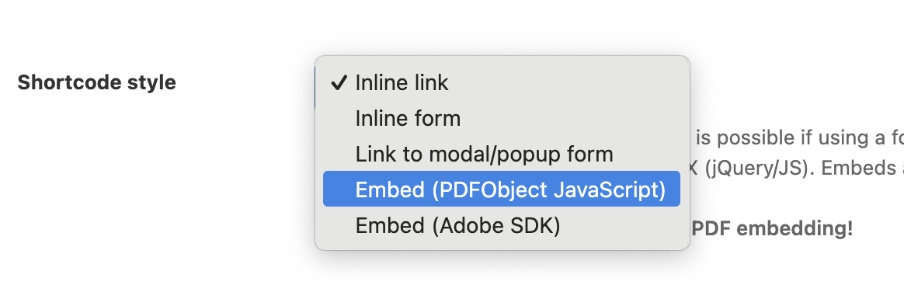
Just select the “Embed (PDFObject Javascript)” option in the shortcode creation pages when creating your shortcode.
PDFObject options can be filtered using the hook: `pdfink_filter_pdfObject_options` which is by default empty. Similar to the hook above (for Adobe embeds), shortcode attributes are passed as the second parameter.
Filtering the parameters for PDFObject embeds allow you to customize the way a PDF file opens in Adobe Reader. You can show/hide toolbars, specify a page number, change the display size, and more. Read Adobe’s specifications to learn more (PDF file). These parameters are not well-supported outside of Adobe Reader — most PDF readers will ignore the parameters, including the built-in PDF readers in Chrome, Internet Explorer, and Safari.