
The two top plugins available for WooCommerce PDF file download watermarking/passwording are WooCommerce PDF Watermark and PDF Ink (sold here). If you’re considering purchasing one or the other, this post will help show you which is the better choice.
Both plugins have been available for many years, both plugins perform the same essential tasks, and yet they are quite different under the hood. They offer different features, and at different price points.
- The bundled software
- Feature comparison
- Image watermarking
- Available fonts
- Watermark opacity
- Watermark locations on the page
- Pages to watermark
- PDF security
- Barcodes
- Product-by-product settings
- File management
- Data Privacy
- Quality Code
- Missing features
- Plugin price
What’s under the hood:
Both plugins use free, open-source PDF manipulation libraries to password and watermark. However, PDF Ink also allows you to add better (paid) libraries to handle complex PDF files more gracefully.
WooCommerce PDF Watermark uses FPDI to parse PDFs and FPDF to re-write them.
As of October 2023, WooCommerce is using version 2.36 of FPDI, released in February 2021. Version 2.5.0 is available, released September this year. This means not only could their parser be faster, but might also be missing security fixes. The plugin uses version 1.8.4 of FPDF, released August 2021, when version 1.8.6, released June 2023 is available.
As of Spring 2025, WooCommerce PDF Watermark has started using our customized, namespaced TCPDI libraries instead of FPDI + FPDF. We are flattered! Maybe that tells you everything you need to know, but if not, please keep reading!
As of Summer 2026, WooCommerce PDF Watermark is now using our full, namespaced TCPDI/TCPDF suite (open-source code we review and hone for PDF Ink) without attribution. We namespaced the suite to try to prevent conflicts with other plugins also including those libraries. We are still “flattered,” but also concerned. Seems like at this point there is no point in paying $50 more for a product that copy and pastes our code… and does less with it. PDF Ink hands down has more settings, more function, and more capacity for customization/extension… but our competition is a corporation owned by WordPress. It’s hard to compete!
PDF Ink can use FPDI + FPDF, but it can also use other libraries like TCPDI, TCPDF, FPDI-PDF Parser, and SetaPDF Stamper. It is designed to be flexible. So if your PDF isn’t happy with one parser, you can change parsers and try again. The free parser sets included with PDF Ink are TCPDI+TCPDF, FPDI+TCPDF, and FPDI+FPDF. Purchase of PDF Ink comes with a 20% discount toward the purchase of FPDI-PDF Parser and/or SetaPDF-Stamper. These advanced libraries allow for handling of PDF files with advanced features such as forms, layers, and internal links/table of contents.
Feature Comparison
Image watermarking
Adding an image to an existing PDF is a feature of both plugins; however, PDF Ink allows you to do it anywhere amidst stamp text using an HTML <img> tag or by setting an image location in the settings panel.
The plugin PDF Watermark for WooCommerce does not allow HTML in watermarks. Lack of control with HTML tags such as <p>, <br>, <strong>, and <em> (to name a few) can be crippling for folks who want to “design” their watermark. Our plugin allows the use of most common HTML tags in watermark text, translated straight onto the page!
Image and text watermarks in the same document
You want two images and text? You can have it. Want three? Two images and some text on the same page? Sure. What makes this possible is PDF Ink uses a different PDF parser/writer than WooCommerce’s plugin, one which writes HTML. So, put HTML in your watermark, such as an tag, and voila! Do you want transparency of your text? We have that here, and are the only WordPress PDF watermarking plugin with that (just use the {OPAC} opacity shortcode).
Fonts
Both plugins come with core fonts offered by their respective PDF manipulation libraries (FPDF/TCPDF). However, PDF Ink allows the administrator to add their own TTF font files so that watermarks can match branding. That means our plugin allows the user to watermark with nearly any font, not just Times, Helvetica, or Courier. Our plugin offers better support for non-English languages, since it also includes different subsetted fonts straight out of the box.
Watermark Opacity
Both plugins allow watermark opacity to be set lower. PDF Ink does this using a shortcode, allowing for hundredth (.01, .02, etc.) increments and for some text to be transparent while other text is not, while the WooCommerce plugin sets opacity in the settings and it applies to the entire watermark.
Watermark Locations
Both plugins offer similar options for placing a watermark anywhere on the page; however, WooCommerce’s offers only one watermark location whereas PDF Ink allows for many watermarks per page. This could allow the administrator to apply two visible watermarks and one tiny invisible watermark, which would increase security, and the potential thief’s paranoia. Hidden watermarks — not visible ones — are perhaps the best way to track PDFs and thwart/fight intellectual property theft. Both plugins would allow hidden watermarks, but with the two placements our plugin allows, it’s easy to make the customer think there’s only one watermark, when in fact there are two!
Our RTL setting is not only handy for RTL languages, but also for aligning marks faithfully along the right margin, such as is useful in marking sheet music.
Pages to Watermark
WooCommerce PDF Watermark allows the administrator to set pages to “All,” “First,” “Last,” or “Alternate”. PDF Ink allows watermarking to start on a specified page (e.g. page 2), end on a specified page, and beyond that allows “All,” “First,” “Last,” “Odd”, or “Even” pages to be watermarked.
With PDF Ink, you get a lot more control of which pages are watermarked.

If you select “Custom” pages in PDF Ink settings, then you can type in your desired pages in a range, such as 2-4,6-8,11. (That’s pages 2 through 4, pages 6 through 8, and page 11.)

You can also use filter hooks included in our plugins to avoid watermarking or passwording any particular PDF page. If you need advice on that, get in touch!
PDF Protection
WooCommerce PDF Watermark allows RC4-128 encryption for PDFs, with the basic four PDF protections of “Disable Print,” “Disable Copy”, “Disable Modify,” and “Disable Annotate”. Arcfour (RC4) encryption is generally accepted as being weak, and so these days if your server can handle it, you want to be using AES encryption for your PDFs.
AES is possible with PDF Ink. AES encryption of PDF offers the four basic PDF protections, as well as more advanced protections like “Disable High-Resolution Printing,” “Disable Assembly,” “Disable Form Filling,” “Disable Accessibility”.
Passwording
Password with user’s email (or phone number if you collect it). Set unique watermarking properties for individual WooCommerce products (or per Download Monitor or per Easy Digital Download product). Even more, PDF Ink allows users to set watermarking properties for variations of products. So each PDF can have a different password, or none. Each PDF can have a different watermark. Each PDF can have different everything.
BARCODING
We have it, they don’t. Read more about adding barcodes to existing PDF files.
Product-by-product plugin settings
WooCommerce’s plugin offers the option to override the watermark content (text/image) or turn watermarking off per product. It does not allow for different watermark settings between product variations.
Our plugin offers FULL override per product, such that if you want a different PDF product to have a totally different content, placement, font, opacity, content, password, and encryption level, that is possible.
PDF Ink also allows full override per product variation, not just per product!
File management
What happens to the PDF files when they’re being manipulated just before delivery, and after delivery? This is a mystery most people don’t spend much time thinking about, but these files can amass and cause problems if left on the server.
WooCommerce’s offering sends altered PDFs to a file with a changed filename into its original folder, yet has no settings or means to send elsewhere or clean up afterward.
PDF Ink sends out PDFs depending on the type of WooCommerce download (in Woo downloadable product settings). If it’s a forced download, no file is stored on the server. Otherwise, files are stored separately in the wp-content/uploads/ directory in a unique folder which can be perused in a meaningful way, since sub-folders are named by customer order number. Furthermore, the plugin includes settings to clean up these files by CRON if desired on a “hourly,” “twice daily,” “daily,” “weekly,” every 15 day,” or “monthly” basis. They can also be left on the server if that is preferred.
When the file is delivered, our plugin does not change the filename. The customer gets the PDF with its intended file name, unless you decide to change the name using filter hooks.
Additionally, if you would like to save on bandwidth, PDF Ink has a unique setting to allow previously watermarked (and stored) PDF files to be re-delivered on customer request, instead of going through marking again (which can be CPU-intensive). We call this recycling.
DATA PRIVACY
Unlike the plugin from WooCommerce, PDF Ink does not track and store file downloads using IP addresses — so it is compliant with GDPR and the California Consumer Privacy Act (CCPA) out of the box. You do not need to hire a lawyer and publish extra legalese in order to add PDF Ink to your online arsenal.
You might notice that in order to purchase PDF Ink, we only require a first name, last name and email address (and billing country/zip if using credit card). You could use a pseudonym and throwaway email address if you want. We don’t need to know all about you to like you. We value privacy highly.
QUALITY Code
Under the hood, our code is clean, simple, and easy-to-follow. It is written and maintained by humans who know it inside and out. It must be good enough, since our competitor uses a portion of our code in their “quality-checked” plugin!
We have added many dozens of WP hooks to make PDF Ink as extensible as possible, and an API to allow non-WordPress users to enjoy it, too. PDF manipulation library selection runs on a PHP factory pattern–so if you’d like to add another, go ahead!
Compatibility with Newer PDF Files
“Unable to serve the file at this time. The file does not support watermarking.”
Does that sound familiar? WooCommerce’s plugin (from woocommerce.com) does not support newer PDFs! If you want to upload a PDF for manipulation with their plugin, it has to be old (version 1.4 and older!). To give you an idea of how bonkers this is, PDF version 1.5 came out in 2003. That was twenty years ago!
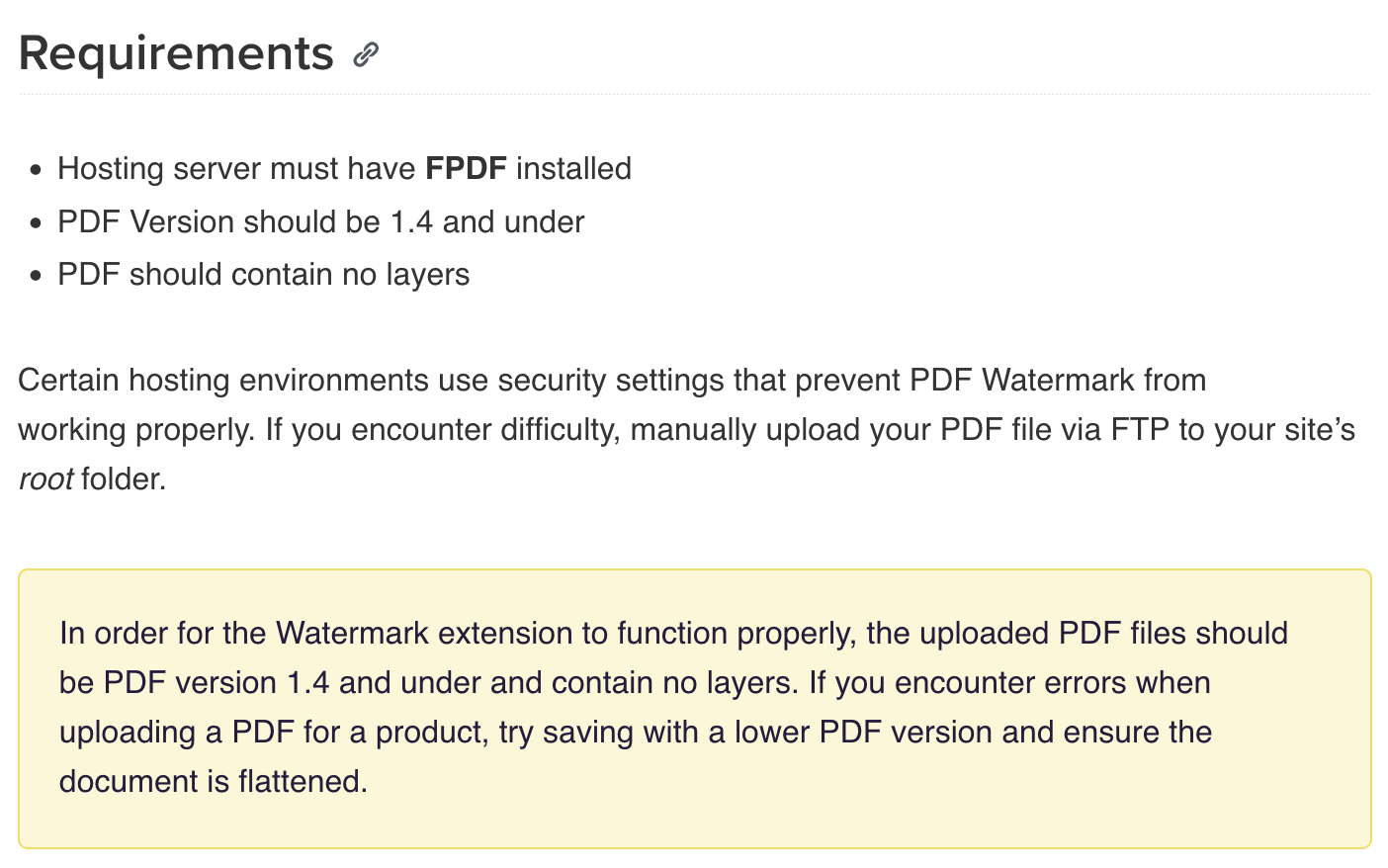
The cheapest way to solve this problem is to switch to PDF Ink. PDF Ink supports all versions of PDF, even in its free version. You’ll enjoy more flexibility with watermarking, and many more features.
Advanced PDF Feature Handling
“Allow watermarks to work on layered PDFs”
We hate to say it, but you’ll never get this feature with a free, open source, PDF parsing plugin. That’s the truth, and it’s because of licensing issues and because better libraries are not free, nor are they licensed GPL. We cannot bundle them with PDF Ink, but PDF Ink was built to be compatible. Read more about preventing loss of features such as layers, forms, and internal links from your files.
“Selectable link stripping”
This feature was “coming soon” on the WooCommerce website PDF Watermark plugin listing for a very long time. If Woo is referring to PDF internal links, they offer that but in a limited and insecure way (using JavaScript and a redirect-type download, which they themselves have deprecated/stopped recommending). PDF Ink matched that feature in the same way, only slightly more secure and less limited, to users who expressly check off on it–e.g. use at your own risk1.
It’s a really odd promise in fact, one we actually cannot fathom. Who wants links, or anything, stripped from their PDFs? If you own a PDF, why not just strip it yourself before sharing it? Maybe something was lost in translation. Maybe they meant something about editing PDF links, which is something PDF Ink can do.
Features missing in WooCommerce’s offering:
- Does not handle PDF versions 1.5, 1.6, or 1.7
- Only one watermark location
- Only one image watermark
- No HTML in watermarks
- No custom fonts
- No RTL watermarking
- No barcodes or QR codes
- File name and placement management
- No RC4-40 or AES encryption levels
- Per-product settings do not have full settings override, or variation override
- Ability to handle more complex/sophisticated PDFs, such as those with fillable forms, layers, incrementation, or web-optimization
Features missing in PDF Ink:
No ePub watermarking(EPUB watermarking added June 2025)
If you need complete fidelity, please use the ONLY plugin capable of handling ALL PDFs: PDF Ink (upgraded with the 3rd party SetaPDF Stamper library).
WooCommerce PDF watermark has internal link fidelity for users who are brave enough to set their file downloads as “Redirect Only.” WooCommerce does not recommend this method because it is not secure. Beyond that, the WooCommere PDF Watermark integration of this feature puts heavy load on the server, often for no reason, and exposes the direct file paths of all PDFs sold to users who hit the cart. So a saavy shopper can just download directly from the exposed URL and receive an un-watermarked, un-passworded copy, or worse; share the file location to friends and strangers. Yikes. As of February 2026 we will offer this feature, but only to people who will check a box to sign off on the fact that this style integration is not a great idea.
The price
Our plugin had always been priced about $10 lower than WooCommerce’s offering, despite offering more features. Then something changed. Currently WooCommerce charges $129 annually, while we charge $80 (with a 50% annual renewal discount). This is impossible to explain. Just enjoy it!
Ultimately, we find that in the case of WooCommerce’s offering, you pay more but get less. Heck! The free version of our plugin offers many of the same features as WooCommerce’s $129 plugin!
If you would like to compare all of the available WordPress PDF watermark plugins, we’ve put together a chart for that. If you are very concerned about your website/PDF security, reach out to us and we will tell you which plugins and configurations to avoid. We’ve learned over the 10+ years doing this that some WP plugin development teams will build A LOT of random, scrappy plugins because… throw enough mud at the wall, some of it will stick.
We welcome you to try out PDF Ink with no risk. We offer a 30-day no questions asked refund policy for the paid version, and priority email support!